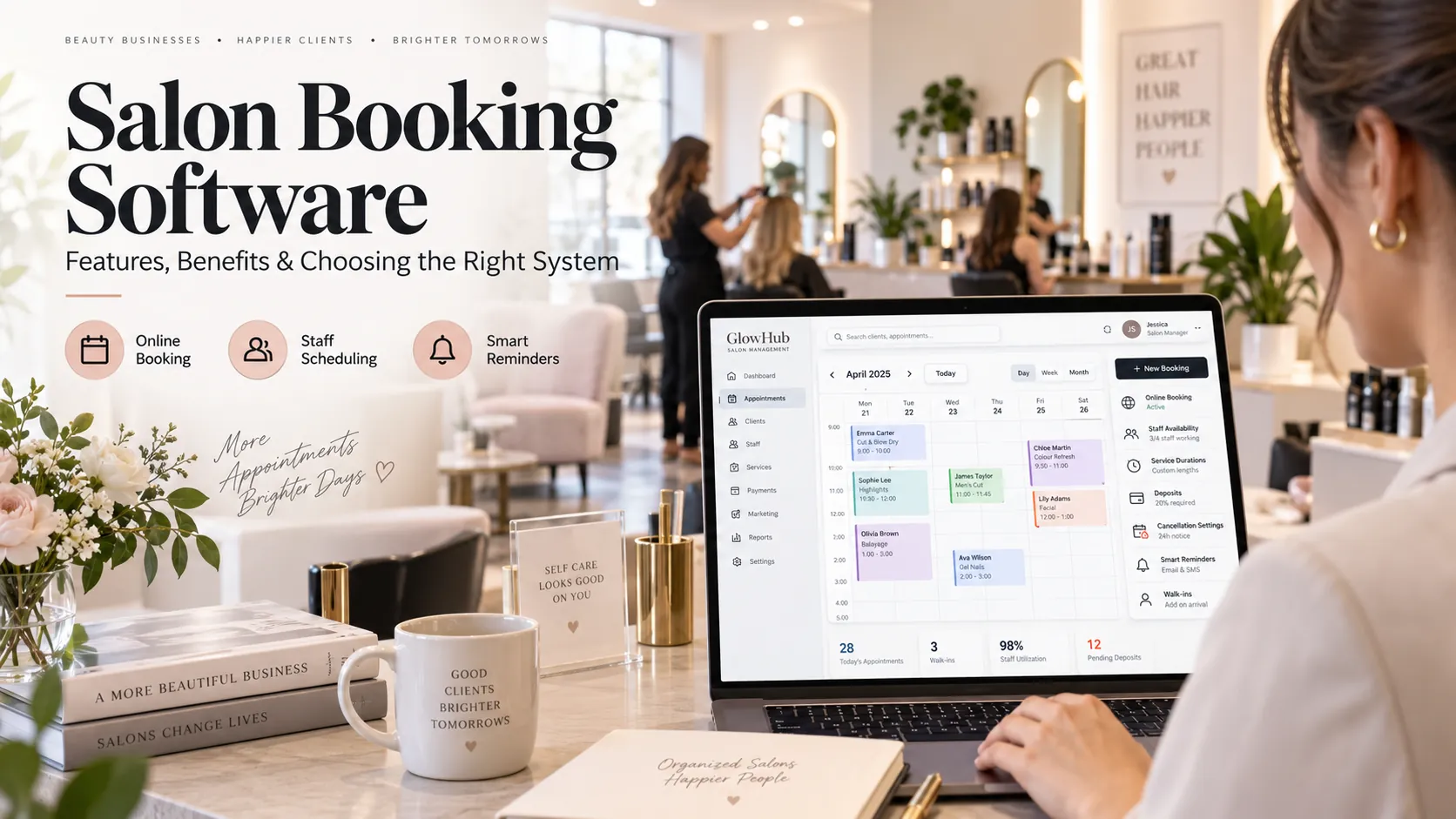
Salon booking software manages appointment availability across customers, staff, services and resources. A strong system allows customers to book online while giving the salon control over opening hours, service duration, staff skills, buffers, deposits, cancellation rules, reminders and walk-ins.
Key takeaways
What is salon booking software?.
Features that make salon booking software reliable.
How to prevent double bookings.
How to implement salon booking software.
Booking is often the first digital interaction a customer has with a salon. If the experience is confusing, slow or inaccurate, the problem reaches the front desk before the customer even arrives.
That is why salon booking software should be evaluated as an operational system, not simply as an online calendar. It has to do two things at the same time: make booking easy for the customer and protect the salon from impossible appointments.
This guide explains the booking logic behind a reliable system, the features that matter, the mistakes that create double bookings and the questions you should ask before choosing a platform.
What is salon booking software?
Salon booking software is a system that creates, manages and updates salon appointments across online and staff-assisted channels.
It normally connects:
a customer-facing booking page or app;
the salon’s live appointment calendar;
staff working hours and service skills;
service durations and prices;
rooms, chairs or other resources where needed;
deposits or prepayments;
confirmation and reminder messages;
rescheduling and cancellation rules;
customer records;
booking and no-show reporting.
The important point is that these components should use the same source of truth.
If a receptionist adds a walk-in, that time must disappear from online availability immediately. If a customer reschedules online, the front desk should see the change. If a staff member goes on leave, the booking page should stop offering their time.
How an online salon booking engine decides what is available
A basic calendar asks, “Is there an empty space?”
A proper booking engine asks several questions before showing a slot:
Is the salon open?
Is a qualified staff member working?
Is that staff member free for the full service duration?
Is any required room, chair or equipment available?
Does the service need preparation or cleanup time?
Is the customer within the allowed advance-booking window?
Is the appointment too close to the current time?
Does the service require a deposit?
Are there any booking restrictions for that staff member or service?
Only after those rules pass should the slot be offered.
This difference matters because a calendar gap is not always sellable capacity.
The ideal customer booking journey
A booking flow should be short enough for a mobile user to complete without assistance.
A practical sequence is:
Service → Location → Staff preference → Date/time → Customer details → Deposit if required → Confirmation
Not every salon needs every step. A single-location salon can skip location. A business that does not allow staff selection can skip that choice.
The principle is to remove unnecessary decisions.
Customers should not be forced to create a complex account before they can even see available times. Service descriptions should be clear. Prices and durations should be shown where appropriate. Cancellation and deposit policies should appear before payment or confirmation, not hidden afterwards.
Features that make salon booking software reliable
Real-time availability
Availability must update immediately when reception, staff or customers change the calendar. Delayed synchronisation is a common source of double bookings.
Service-specific duration
A haircut, facial, massage and colour service may require very different amounts of time. The software should support accurate duration at service level and, where necessary, staff-specific duration.
Staff skills
A system should not show every employee as available for every service. Assigning skills to staff protects both the customer experience and the schedule.
Buffer time
Some services require preparation, cleanup or transition time. Buffers should block capacity automatically rather than relying on staff to add manual blocks.
Resource booking
A salon may have more staff than treatment rooms or more stylists than wash stations. If a service requires a physical resource, the booking engine should reserve it.
Deposits and prepayments
Deposits can help protect high-value or long-duration appointments. They should be configurable rather than forced across the entire service menu.
Waitlists
A waitlist lets the salon capture demand when the preferred time is unavailable. Ideally, the system helps staff fill cancellations from that list.
Reminders
Confirmation and reminder automation reduces manual calling and gives customers a clear route to confirm, cancel or reschedule.
Customer self-rescheduling
Self-service is valuable when it follows the salon’s rules. The system should recheck availability, notice periods and deposit conditions before offering a new time.
How to prevent double bookings
Double booking is usually not one problem. It can be caused by several failures:
online booking and reception use different calendars;
a service needs a room that is not reserved;
staff shifts are not updated;
processing or buffer time is ignored;
the same resource is assigned to two bookings;
changes made in one channel do not sync quickly;
staff create unofficial bookings outside the system.
Prevention starts with one central calendar and clear rules.
During a demo, deliberately try to create a conflict. Book a service online, then attempt to use the same staff member or room from reception. Mark the staff member on leave. Change the duration. Add a walk-in.
You learn more by trying to break the calendar than by watching a perfect demo.
Deposits: when they help and when they create friction
A deposit is a business-policy tool, not a universal solution.
It is most useful when a missed booking creates meaningful cost, such as:
long appointments;
bridal or event services;
high-value colour work;
services that block scarce rooms or equipment;
customers with repeated late-cancellation history.
For quick, low-risk services, requiring payment upfront may create more friction than value.
Good salon booking software lets you define deposit rules by service, customer type or other sensible conditions. It should also make refunds, transfers and credits easy to understand.
Cancellation and no-show management
A cancellation and a no-show should not be recorded the same way.
A cancellation provides some warning and may allow the salon to refill the slot. A no-show consumes capacity with little or no notice.
Track both separately.
Useful reports can help answer:
Which services have the highest no-show rate?
Does no-show rate increase with longer booking lead time?
Are certain reminder timings more effective?
Are new customers more likely to miss appointments?
Do deposits change behaviour for long services?
Which time periods are hardest to refill?
The point is not to penalise customers automatically. It is to design a policy using evidence.
Booking software should connect to the client CRM
The booking form is the beginning of the customer record, not the whole record.
Capture only what is needed to fulfil the appointment, such as name, contact details and relevant booking information. After the customer visits, the CRM can build a richer history around completed services, preferences, packages, spend and future appointments.
This connection is important for retention.
A customer who had a particular service six weeks ago and has no future booking is a more meaningful follow-up candidate than someone selected only because they are in a large contact list.
Booking software should connect to POS
At checkout, staff should not need to rebuild the appointment manually.
The bill should inherit the customer, booked services and staff, while allowing authorised changes for add-ons or service adjustments. This improves data quality for revenue reporting, commissions and customer history.
If a deposit was collected, it should be visible and correctly applied.
When booking and POS are separate, staff often end up reconciling records by hand.
Mobile booking matters more than having a native app
Most customers will encounter the booking experience on a phone.
Test it on a normal mobile connection.
Check:
how quickly the page loads;
whether services are easy to scan;
whether buttons are large enough;
whether availability is clear;
whether account creation is mandatory;
how many fields the customer must fill;
whether payment works smoothly;
whether confirmation is immediate;
whether rescheduling is easy to find.
A fast mobile website can be more useful than a native app that customers must install before making a first booking.
What salons in India should check
For Indian salons, practical integrations can matter as much as the booking calendar itself.
Check support for:
WhatsApp confirmations and reminders;
UPI-friendly payment flows;
GST-ready invoices after service completion;
multiple branches;
staff commission structures;
packages and prepaid balances;
Indian phone-number verification;
local support hours.
If WhatsApp is a major booking channel today, the objective should be to move structured bookings into the system while still using WhatsApp for communication. Do not let customer messages remain an unofficial second appointment book.
Salon booking software buying checklist
Area
What to test
Availability
Can it handle staff, services, rooms and buffers together?
Mobile UX
Can a new customer book in a few minutes on a phone?
Staff
Can availability follow shifts, leave and skills?
Walk-ins
Does a walk-in immediately update online capacity?
Deposits
Can rules differ by service?
Rescheduling
Can customers change bookings within your policy?
Reminders
Are timing and templates configurable?
CRM
Does the booking become part of customer history?
POS
Do services and deposits flow into checkout?
Reporting
Can you see cancellations, no-shows and booking source?
Data
Can you export customer and appointment data?
Support
Can support answer operational questions?
How to implement salon booking software
Step 1: clean the service menu
Remove duplicate service names. Confirm prices and durations. Decide which services can be booked online.
Step 2: configure staff
Add working hours, skills, breaks, leave rules and any staff-specific service duration.
Step 3: define resources
Identify treatment rooms, chairs, equipment or other capacity that must be reserved.
Step 4: set booking policy
Decide advance-booking windows, same-day cut-offs, cancellation notice, deposit requirements and rescheduling rules.
Step 5: write customer messages
Prepare confirmation, reminder, reschedule and cancellation messages in your brand voice.
Step 6: test edge cases
Create conflicts on purpose. Test walk-ins, leave, long services, deposits, cancellations and refunds.
Step 7: launch gradually
If the service menu is complex, start with the services you are most confident the rules can handle. Expand after the team trusts the system.
Metrics worth reviewing after launch
A good booking report should help improve operations.
Track:
total bookings by source;
online vs staff-assisted bookings;
booking lead time;
cancellation rate;
no-show rate;
reschedule rate;
repeat booking;
demand by day and hour;
staff utilisation;
unfilled peak capacity;
deposit usage.
Do not chase a single metric. For example, higher utilisation is not necessarily better if it creates late running and removes required buffers.
Search and AI usefulness
This article keeps salon booking software as the primary subject and answers the main follow-up questions within one page rather than creating thin pages for minor keyword variations. For stronger visibility over time, add original screenshots, workflow diagrams, verified customer examples and first-party benchmarks when available. Those assets give readers information that generic summaries cannot reproduce.
Frequently asked questions
What is the difference between salon booking software and scheduling software?
Booking software focuses on creating and managing customer appointments. Scheduling software often goes deeper into staff shifts, resource allocation and capacity planning. Many modern salon platforms combine both.
Can salon booking software manage walk-ins?
Yes. Walk-ins should be added to the same live calendar used for online booking so the remaining capacity stays accurate.
Should customers be allowed to choose a stylist?
It depends on your model. Some salons let customers choose a preferred professional or select “any available” for the earliest slot. The software should support whichever policy fits the business.
Do deposits reduce no-shows?
They can protect high-risk appointments, but they also add friction. Use them selectively and measure the outcome instead of applying the same policy to every service.
Can salon booking software send WhatsApp reminders?
Many systems can connect to WhatsApp or messaging providers. Check template management, message charges, consent, automation rules and delivery reporting.
What should I test before buying?
Test your hardest booking scenario, not your easiest one. Include staff skills, a resource constraint, a walk-in, a cancellation and a reschedule.
Final thoughts
Good salon booking software makes availability trustworthy.
Customers should be able to book without unnecessary friction. Staff should see the same calendar. Owners should retain control over capacity, policies and data.
If the system does those things well, online booking becomes more than a convenience feature. It becomes part of how the salon sells and manages its time.