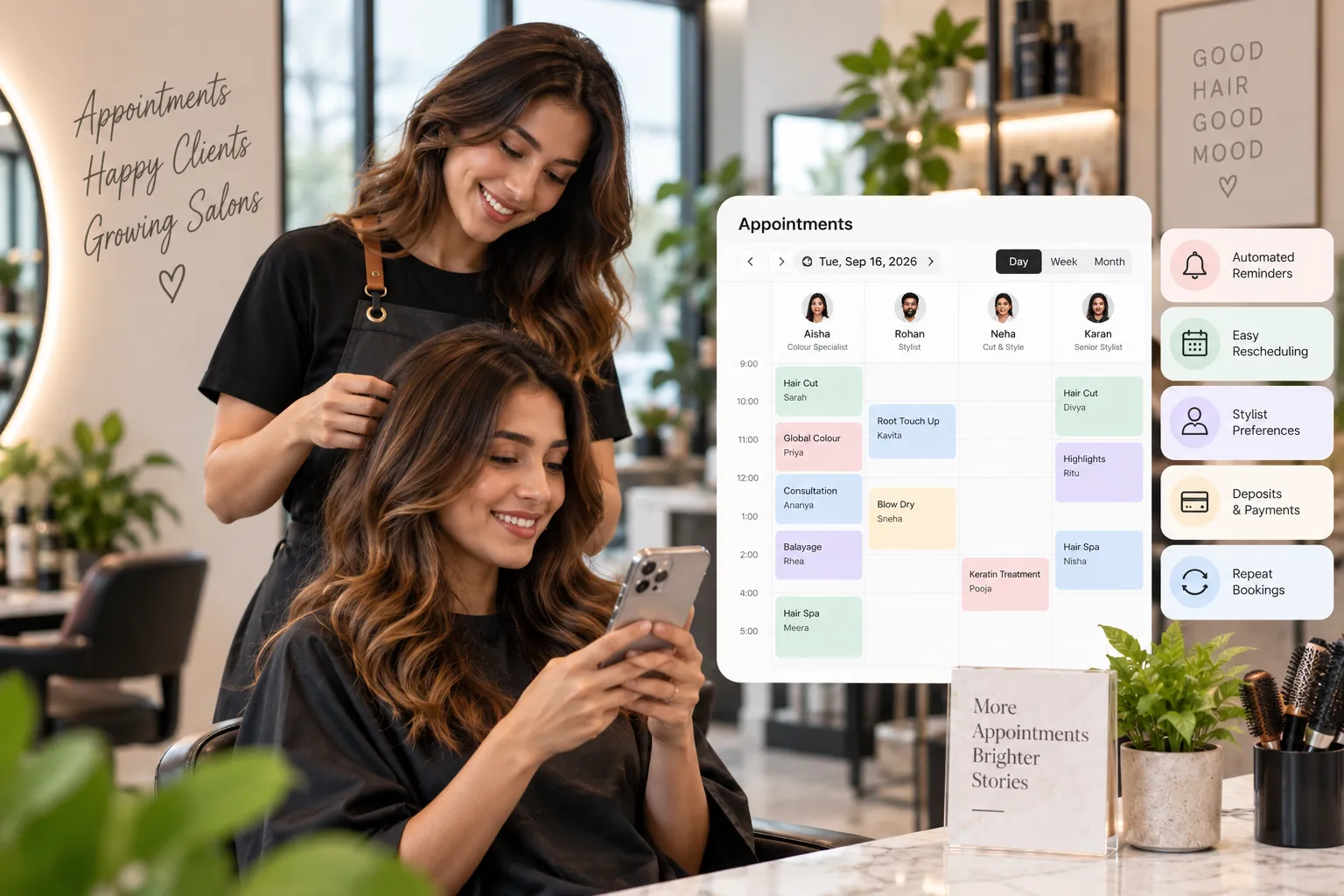
Hair salon appointment software manages each client visit from booking and confirmation through arrival, service changes, payment and rebooking. Hair-specific systems should also handle stylist preferences, colour timing, assistants, deposits and repeat-service cycles.
Key takeaways
The hair appointment lifecycle.
Booking data.
Confirmation.
Hair-specific reminder logic.
Client arrival.
A hair appointment often changes after it is created.
The customer arrives and asks for a treatment. The stylist decides the colour service needs more time. A junior stylist hands part of the service to an assistant. A client arrives late and the next appointment is affected.
That is normal salon life.
Hair salon appointment software should make those changes manageable without losing the history of what was booked, what was delivered and who did the work.
The hair appointment lifecycle
A useful lifecycle might be:
Booked → Confirmed → Arrived → In Service → Completed → Billed → Rebooked
Other outcomes include:
cancelled;
no-show;
rescheduled.
The exact labels matter less than consistency.
If one stylist marks “completed” when the service is done and another uses “completed” after payment, reports become confusing.
Define the meaning of each status during setup.
Booking data
A hair appointment should start with:
customer;
service;
stylist;
time;
duration;
location;
relevant booking notes.
Complex colour work may also include consultation or provisional service information.
The record should be editable as the appointment becomes clearer.
Confirmation
A booking confirmation reassures the customer that the salon has the appointment.
Include:
date;
time;
salon location;
service;
stylist if selected;
deposit status;
change/cancel option.
Do not overload the message with every salon policy.
Link to additional information where appropriate.
Hair-specific reminder logic
Different services may deserve different reminders.
A long colour service booked six weeks in advance may need:
early reminder;
final reminder;
patch-test or preparation instruction.
A haircut booked tomorrow may need only one message.
The system should let the salon configure reminders by service or appointment type.
That feels more relevant than a universal template.
Client arrival
Check-in tells the team the customer is physically present.
It can help reception and stylists distinguish:
not arrived;
waiting;
in service;
complete.
This becomes important when the salon has several chairs and multiple professionals.
A live status board can reduce verbal coordination.
Late arrivals
Late arrival handling should follow policy.
The software can show the operational impact.
If a customer is 20 minutes late for a 45-minute haircut, the salon may:
shorten the service;
reassign;
move the booking;
reschedule.
For a three-hour colour service, the consequences may be more serious.
The platform should help staff see the next appointment and available alternatives before deciding.
Service changes after consultation
Hair appointments often change.
Examples:
haircut becomes restyle;
colour adds toner;
treatment is added;
blow-dry is removed;
service duration changes.
Update the appointment record, not only the bill.
This keeps schedule data, staff performance and customer history aligned with reality.
Colour appointments
Colour is a good test of appointment depth.
The record may need to represent:
application;
processing;
wash;
finishing;
assistant;
resources.
Not every system needs to expose those stages to every staff member.
But the operational schedule should be capable of handling them where they affect capacity.
Customer notes
Hair salons may keep service notes such as:
preferred finish;
product used;
formula reference where appropriate;
sensitivity or service considerations legitimately required;
stylist preference.
Keep notes structured where possible.
Limit access to staff who need the information.
Avoid storing unnecessary personal information.
Deposits
Appointment software should connect the deposit to the booking.
Reception should be able to see:
amount paid;
date;
payment method;
balance;
refund status.
If the customer reschedules within policy, the deposit should move with the appointment.
This avoids confusion at checkout.
No-shows
No-shows should remain in the appointment history.
Track them separately from cancellations.
Useful hair-salon analysis includes:
no-shows by service;
no-shows by booking lead time;
new vs repeat customers;
stylist;
deposit vs no deposit;
reminder method.
Use the patterns to design policy.
Do not automatically assume one deposit rule will suit every service.
Checkout
The appointment should feed the POS.
The final bill can include:
booked service;
add-ons;
products;
package;
deposit;
discount;
payment.
Staff should not need to retype the customer or stylist.
This connection improves commission and revenue data.
Rebooking
At checkout, the stylist may recommend the next visit.
The appointment software should make it easy to:
open the preferred stylist calendar;
find the recommended interval;
create the next booking;
send confirmation.
If the customer does not rebook, the CRM can later identify them for follow-up.
Appointment software and customer retention
Retention is not one feature.
It comes from connected appointment history.
A salon can identify:
customers whose normal return interval has passed;
first-time clients who did not rebook;
colour clients without a future visit;
high-value customers becoming less frequent;
clients with unused package value.
Appointment history becomes a behavioural dataset.
That is much more useful than a static contact list.
Reporting
Hair salon appointment reports may include:
booked;
completed;
cancelled;
no-show;
rescheduled;
confirmed;
average lead time;
rebook rate;
repeat interval;
stylist utilisation;
service mix.
Look at ratios, not just totals.
For example, a stylist may have many appointments but a low rebooking rate.
That creates a different management question from a stylist with a smaller book and strong repeat behaviour.
How to evaluate the software
Create a colour appointment
Test service stages or processing.
Add an assistant
See how staff attribution works.
Change the service
Update duration and price.
Mark the customer late
Check the downstream calendar.
Reschedule
Verify deposit and history.
No-show
Confirm it remains in reporting.
Checkout
See whether the appointment flows to POS.
Rebook
Create the next visit.
Mobile
Ask the stylist to view the customer and schedule.
Export
Confirm appointment history can be retrieved.
Implementation
Define statuses first.
Then configure:
services;
staff;
duration;
reminders;
deposits;
cancellation policy;
check-in;
checkout;
rebooking.
Train staff on the lifecycle.
Do not expect useful reporting if employees use statuses differently.
For the first month, review “open” or incomplete appointments at the end of each day.
That simple discipline improves data quality quickly.
Appointment source matters
A hair salon may receive appointments through the website, Google, Instagram, WhatsApp, phone, walk-in and staff rebooking.
Record the source automatically where possible.
Source data can answer useful questions:
Which channel creates new customers?
Which channel produces the most completed visits?
Do one source’s bookings cancel more often?
Which marketing campaigns create high-value services?
How much business comes from staff rebooking?
Avoid turning source attribution into a reception burden. If a staff member has to ask every client a long marketing questionnaire, the data may become inconsistent.
Waitlists for popular stylists
A stylist with a strong book may have more demand than available time.
A waitlist can record customers willing to take an earlier or cancelled slot.
Capture:
service;
stylist preference;
acceptable dates;
time range;
contact channel.
When a cancellation occurs, the salon can quickly identify suitable customers.
The system should distinguish a waitlist request from a confirmed appointment. Never create the impression that the customer has a booking until the slot is accepted.
Appointment software for multiple branches
If a hair salon operates more than one location, appointment data should respect branch rules.
Test:
stylist working across branches;
branch-specific service menu;
different prices;
customer history across locations;
package redemption;
booking transfer;
permissions.
If a stylist is working in Gurgaon in the morning and Delhi in the afternoon, the system should not show overlapping travel-time availability.
Using AI with appointment history
Appointment data can support useful AI-assisted analysis.
The owner might ask:
Which clients are overdue for colour?
Which stylists have rising cancellation rates?
Which services are most often added after consultation?
Which time slots create the most overruns?
Which first-time clients did not rebook?
These questions become valuable only if the appointment lifecycle is recorded consistently. AI cannot infer reliable patterns from deleted no-shows, duplicate customer records or services that are changed only on the final invoice.
Treat accurate appointment history as the asset. AI is a faster way to explore it.
Daily data-quality check
For the first few weeks after launch, review appointments that are still open at the end of the day.
Ask why they were not marked completed, cancelled or no-show.
This small operational habit prevents incomplete appointments from distorting staff utilisation, rebooking and revenue analysis. It also reveals where the status workflow is confusing.
Once staff use the lifecycle consistently, the review can become exception-based rather than manual.
Search and AI usefulness
This article keeps hair salon appointment software as the primary subject and answers the main follow-up questions within one page rather than creating thin pages for minor keyword variations. For stronger visibility over time, add original screenshots, workflow diagrams, verified customer examples and first-party benchmarks when available. Those assets give readers information that generic summaries cannot reproduce.
Frequently asked questions
What is hair salon appointment software?
It manages the full lifecycle of hair appointments and connects them to client history, staff and checkout.
Can it manage colour appointments?
Some systems support processing stages or flexible duration. Test the exact workflow.
Can it send reminders?
Most modern platforms support automated reminders through one or more messaging channels.
Can it track no-shows?
It should. Keep no-show as a distinct outcome rather than deleting the appointment.
Can it handle deposits?
Many systems can attach deposits to appointments and apply them at checkout.
Why is rebooking important?
Hair services naturally repeat. Rebooking turns the appointment system into a retention tool.
Final thoughts
The best hair salon appointment software preserves the story of the visit.
It knows what was booked, what changed, what was delivered, who worked on it and what should happen next.
That operational history makes the salon easier to manage and gives retention automation better data to work with.